
Apple TV: Shows, Movies & More
AppleEntertainment
4.5593.00 Reviews
- Version
- 16.4.0
- Installs
- 10.00M
- Age Rating
- Teen
Screenshots
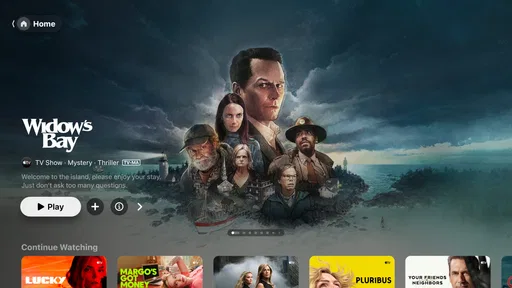

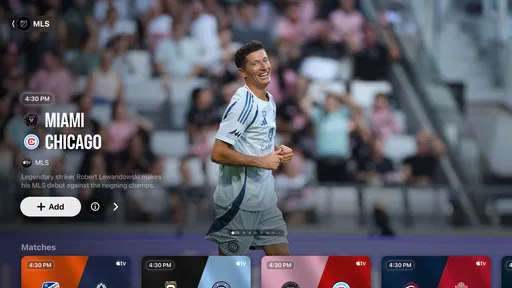
Our Review of Apple TV: Shows, Movies & More
 Analysis by Appyee
I tend to notice Apple TV most when my connection is doing its job quietly in the background. A show starts, the picture settles, and I can get on with watching rather than troubleshooting. When the network is weak, though, streaming becomes the whole experience. That makes this entertainment app a good fit for a reliable home connection, and a less predictable companion for travel or patchy mobile data.
When the network is part of the viewing experience
Streaming is convenient because I can move from browsing to watching without handling discs or files, but it depends on a steady connection. A busy household can make that more noticeable: someone else’s video call or a congested Wi-Fi network may affect playback even when the app itself feels straightforward. I’d test a demanding stream at the time I usually watch, rather than assume a connection that works for browsing will feel equally dependable for a film.
For a calmer evening, I find it helps to choose something before settling in instead of repeatedly switching between titles. Apple TV’s recommendations can make discovery easier, but a long browsing session is still time spent online and can leave me with too many options. I use search when I already have a title in mind, and browse when I’m genuinely open to suggestions. That small distinction makes the app feel more useful and less like another endless menu.
Using it away from the sofa
On a phone or tablet, the app is handy for filling a train ride or a quiet break, provided the connection is dependable. The trade-off is that mobile viewing competes with other demands on the same network. If a stream pauses, I first check whether other apps are also struggling; that helps separate a general connection problem from an issue limited to playback. I’d also avoid assuming that a title will be ready without a connection, since the experience described here is based on streaming.
For shared viewing, a larger screen is usually more comfortable than gathering around a phone. Apple TV’s consistent feel across Apple devices is useful when I move between them, though the device you use still shapes the practical experience. Before planning a family movie night, I’d sign in and check that the app works on the intended screen rather than waiting until everyone is ready. That simple check prevents account or connection setup from becoming the evening’s main event.
What I do when playback falters
When a show stalls, I don’t immediately blame the app. I check the Wi-Fi or mobile connection, then try a different title or reopen the app if the problem appears limited to one playback session. If other services are also slow, restarting the router or moving closer to it may be more useful than repeatedly tapping play. These are ordinary troubleshooting steps, but they matter because a streaming app cannot make an unstable network reliable.
There is a useful difference between a brief interruption and a recurring problem. If playback resumes quickly, I may simply continue; if it keeps stopping, I switch to a stronger connection or watch later rather than spend the whole evening fighting it. I also try to remember where I stopped, since the app’s resume feature can help me return to a programme after changing devices. It’s a practical recovery route, not a substitute for stable service.
Keeping data use in mind
Mobile streaming can use a connection that I may need for maps, messages, or work later, so I’m cautious about treating a cellular plan as unlimited entertainment. If I’m out for the day, I keep viewing sessions short and save longer films for a dependable home connection. I also check the device’s own data controls when I want to understand or limit background and streaming use. That is more useful than guessing from how long an episode feels.
Families may want to consider both connectivity and spending before choosing the app. Apple TV is free to install, but some content involves in-app purchases, with listed items ranging from $9.99 to $199.99. I’d check the terms of a particular title or subscription before confirming a purchase, especially on a shared device. A free app does not mean every programme is included at no additional cost, and that distinction is worth keeping clear.
Your Gateway to Entertainment
First off, let’s talk about the interface. When you first open the app, you’re greeted with a sleek and intuitive design that’s just so easy to navigate. Apple has always been known for its minimalist aesthetic, and this app is no exception. The home screen is all about showcasing content that’s tailored to you, thanks to some seriously smart algorithms. It feels like the app knows exactly what I want to watch before I even do!
The Content Galore
Now, onto the good stuff—content! One of the standout features of Apple TV is its vast library. From the latest movies and series to classic films and exclusive Apple Originals, the selection is pretty impressive. I’ve found myself getting lost in a sea of options, which isn’t a bad problem to have!
Apple Originals are a particularly exciting aspect. With critically acclaimed shows like "The Morning Show" and "Ted Lasso," there’s no shortage of exclusive content. Plus, the quality of these productions is top-notch, which is something I’ve come to expect from Apple.
User Experience: Smooth Sailing
Using the app is a breeze. I find the search function to be incredibly efficient, helping me find exactly what I’m looking for in no time. The playback is smooth, with no annoying buffering issues, even when I’m streaming in HD. Kudos to Apple for making sure the technical side of things is as polished as the content itself.
Another thing I love is how the app keeps track of what I’m watching. It’s super easy to pick up right where I left off, and the app even suggests similar content I might enjoy. It’s like having a personal entertainment assistant in my pocket.
Integration and Accessibility
The integration with other Apple devices is seamless. Whether I’m watching on my iPhone, iPad, or Apple TV device, the experience is consistent. And the best part? The family sharing feature. I can share my subscription with up to six family members, making it a great value for larger households.
Accessibility is another strong suit. With features like subtitles, audio descriptions, and a variety of language options, Apple TV ensures that everyone can enjoy the content, regardless of their needs.
Who will get the most from it?
I’d recommend Apple TV to someone who wants Apple Originals and a focused place to browse films, series, and live sports, especially if they already use Apple devices. A household can also benefit from watching on different screens and using family sharing, while accessibility options make it easier to choose suitable viewing settings. Apple develops the app, which is in the entertainment category and carries a Teen age rating.
It is less compelling if your main goal is a single, low-cost catalogue that guarantees every title is included. The app is free, but purchases and subscriptions can change the overall cost, so I would compare what you actually plan to watch with the price of other services before committing. Someone who mostly watches free video clips or wants a broad collection of unrelated services in one place may prefer a different option.
How it fits beside other streaming choices
Compared with general video platforms, Apple TV feels more oriented toward professionally produced films and series, along with Apple Originals and live sports. That focus is appealing when I want a deliberate movie or show, but it may not replace services built around user-uploaded clips, niche programming, or a larger mix of third-party catalogues. The right comparison is not simply which app has the most tiles; it’s whether the titles you regularly watch are available at a cost you’re comfortable with.
For a practical example, I might browse during a lunch break, add a show to my mental shortlist, then watch an episode at home after dinner on a stronger connection. If I’m choosing for a group, I’d check that the programme suits everyone and that the account and screen are ready before people sit down. Those small habits make the recommendations, resume tracking, and cross-device experience more useful than using the app as a last-minute search box.
Details worth checking before you settle in
The app has a 4.4 average from around 6.6 thousand ratings, and it has passed 10 million installs. Those figures suggest that it has found a substantial audience, but they don’t tell me whether its catalogue matches your taste or whether your network is strong enough for smooth viewing. I’d treat them as context, then decide based on the shows you want, the screens you use, and the costs attached to the content you choose.
Apple TV was released on November 3, 2020, and its current version is 16.1.0. It requires operating system version 8.0 or later. Those compatibility details are worth checking on an older device before planning a trip or family screening; an app that cannot run on the device you have is no help, even if the service itself sounds appealing. The app has also accumulated 373 written reviews, but personal priorities—especially catalogue, connectivity, and spending—are more useful decision points than a review count alone.
Conclusion: A Must-Have App?
All in all, I’d say Apple TV is a fantastic app for anyone looking to expand their viewing options. It’s packed with features that make it a pleasure to use, and the content library is rich enough to keep you entertained for hours on end. If you’re already in the Apple ecosystem, it’s a no-brainer. And even if you’re not, the app is worth checking out for its exclusive content alone.
So, if you’re on the lookout for a new way to experience your favorite shows and movies, give Apple TV a whirl. Who knows? You might just find your next binge-worthy series!
My connectivity verdict
For me, the app works best as a planned part of a reliable home setup: I browse, choose a title, and let the screen do its job. On the move, it is more dependent on signal quality and data limits, so I would be selective about when I stream. Its smooth playback and resume tools can make ordinary viewing feel effortless, but neither removes the need for a sound connection.
My practical recommendation is to try it if its originals, sports, and device integration line up with what you watch, then check the cost of the content you care about and test playback on your usual network. Skip it if you expect every title to be included for free or need dependable viewing wherever you go. That is the clearest way to decide whether this particular entertainment app belongs in your routine.
Verdict
Strengths of Apple TV: Shows, Movies & More
- High-quality streaming experience.
- User-friendly interface.
- Wide range of available content.
- Integration with other Apple devices.
- Supports multiple streaming services.
Limitations of Apple TV: Shows, Movies & More
- Limited app availability compared to competitors.
- Requires stable internet connection.
- Higher subscription costs.
- Occasional buffering issues.
- Limited customization options.
Other Releases by Apple
View All
iTunes
Video Players & Editors4.7

Apple TV: Shows, Movies & More
Entertainment4.1

Apple Music
Music & Audio4.5

Move to iOS
Tools3.6
Similar Picks in This Category
View All
Google Play Games
Google LLC3.9

Netflix
Netflix, Inc.4.8

YouTube Kids
Google LLC4.2

Disney+
Disney4.4

Prime Video
Amazon Mobile LLC4.7

Steam
Valve Corporation3.2
Frequently Asked Questions
What devices are compatible with Apple TV?
Apple TV is compatible with a wide range of devices. You can use it on iPhones, iPads, and iPods with the latest iOS updates. It is also available on Apple TV devices, select smart TVs, and gaming consoles. Ensure your device supports the Apple TV app to enjoy seamless streaming.
Is an Apple ID required to use Apple TV?
Yes, an Apple ID is essential to access Apple TV. It allows you to sign in, manage subscriptions, and make purchases. If you don't have an Apple ID, you can easily create one. An Apple ID also enables syncing across devices, ensuring your watchlist and preferences are always up-to-date.
Does Apple TV offer a free trial period?
Apple TV typically offers a seven-day free trial for new subscribers. This allows you to explore the content library and decide if the service meets your entertainment needs. Remember to cancel before the trial ends if you choose not to continue, as it automatically transitions to a paid subscription.
Can I download shows for offline viewing on Apple TV?
Yes, Apple TV allows you to download shows and movies for offline viewing. This feature is perfect for watching content without an internet connection, such as during travel. Simply select the download option on the content you wish to watch offline, and it will save to your device.
How is the streaming quality on Apple TV?
Apple TV provides high-quality streaming, including 4K HDR and Dolby Atmos support on compatible devices. The quality depends on your internet connection and device capabilities. With a strong connection, you can enjoy crisp visuals and immersive audio, enhancing your viewing experience.
